You can search for client accounts, or list all client accounts, and include the number of participants in each account. This can help identify what accounts should be stand alone accounts for random selection or should be a consortium member. When you generate a random from a stand-alone account, the random selection only picks from the eligible participants in the account. When you generate a random selection from a consortium it picks participants across all member accounts.
To list all accounts tap the ALL option (outlined in red) or enter a search filter to find a specific account, and check the box Include No. of Participants (outlined in red below):

In the screenshot below Tramuc Transport shows it has 84 participants. Near the right side of the listing the chain-link icon  indicates the account is a member of a consortium.

An account with 8 or more participants can be a stand-alone account and meet the annual target of 50%, with quarterly random selections
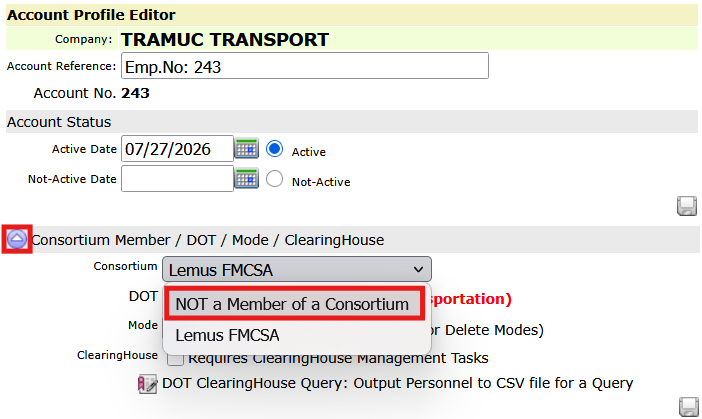
To remove an account from a consortium tap its edit icon  to open the account profile editor.
When the profile editor opens, tap the triangle icon (highlighted in red below on the left) to open the Consortium / DOT section. In the drop-down select Not a Member … and tap the save icon  write any profile modifications to the database. Similarly, you can add an account to a consortium by choosing the consortium in the drop-down, then save the account profile.