
To generate a random selection from the participants in a single account, as a “stand alone pool” (not a consortium of multiple companies): in this example click the random selection icon  for Janatorial Staff:
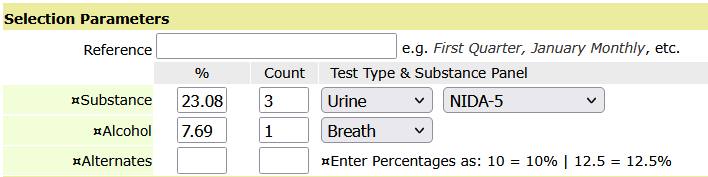
This will open the random selection control where you enter the number of participants you want for a drug test and the number you want for an alcohol test if you need to select for both.
In the example below, 3 participants will be selected for a [Urine] drug test and 1 participant for an alcohol [Breath] test. The lab panel will be set as the NIDA-5 (standard FMCSA 5-Panel). Don’t forget to enter the Reference (First Quarter, Second Quarter, etc.). Below the section shown below, click the button Generate the Random.
DrugTestNetwork/RandomWare features comprehensive random selection utilities to pick participants for drug and alcohol testing to comply with drug free workplace policies or to stay in compliance with US DOT (Department of Transportation) regulations. The application features resources to generate random selections from stand alone pools or a consortium of multiple companies. Specify annual percentage targets, for stand alone pools or consortia, and the the random selection control will automatically keep the selections on track so you will hit the annual target of participants required for both the drug and the alcohol tests.