
Every consortium and account that is a stand alone pool has a random selection profile with the parameters and attributes that set the controls for the random selection module, and include the annual target percentages, the default test types and the default panel that species the substances to be tested.
To manage the profile for a consortium: on the main page, choose the consortium in the drop-down selection and tap the edit icon (outlined in red below) to open the consortium profile. In the example below, the consortium named FMCSA has been selected.

The consortium profile can also be opened from the Consortia page. Tap the Consortia menu at the top of the page:

When the profile editor opens, specify the random selection parameters as needed.
In the example below, the substance panel is set to NIDA-5 (standard DOT 5 Panel), the sample to be collected for the substance test is set to Urine, and the alcohol test is set to Breath.
The annual percentage for substance is set to 45%, and alcohol is set to 10%.
In this example the number of randoms to conduct for the year is set to 4 for quarterly randoms. If starting halfway through the year, with anticipation to only generate 2 random, change the 4 to 2. The percentages will be adjusted for each random selection accordingly.
Adjust the percentages to suit your objectives and click the Save (or Submit) button at the bottom of the page.
Random Selection Profile Example (Stand Alone account)
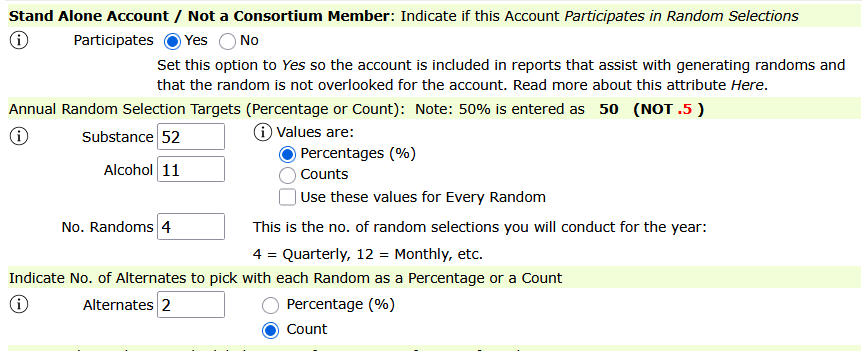
In the example below, the annual target for substance testing is 52 percent. For DOT FMCSA compliance, the annual target is 50%, so this examples provides a little cushion. The annual target for alcohol is set to 11%. The number of randoms is set to 4, and means that 4 randoms (quarterly) will be conducted for the year. Alternates is set to 2 and the option Count is selected which means the random selection control will be preset to pick 2 alternates each time the random is run.
Tap the info icon for more information about each component:

This is an example of the profile for the consortium: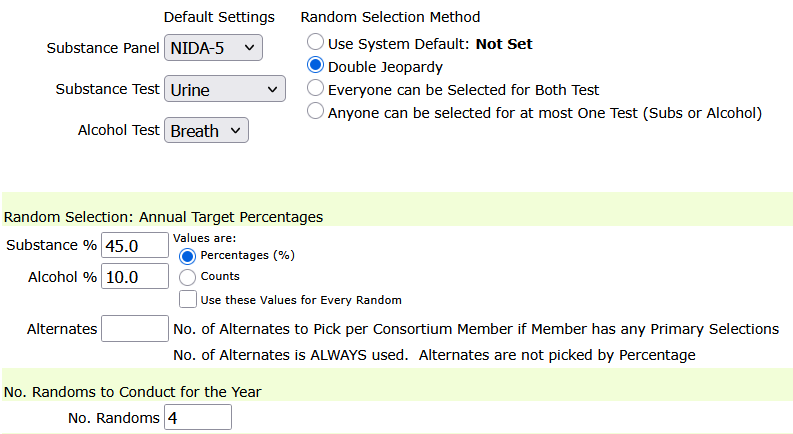
Accounts that are Stand Alone Pool: To manage the profile for a stand alone pool, open the account profile editor where the random selection profile for the account is managed.
To access the Account Profile for a stand alone account, search for the account, and tap the account profile editor symbol. The example below opens the profile editor for J&K Cargo – click the edit symbol (outlined in red below).

In the profile editor, scroll down the page to find the random selection profile. Tap on the triangle symbol to open and close the section. Not all the parameters and attributes are shown here – there are similar parameters for the account as shown in the example above for a consortium and used exactly similarly for random selections from stand-alone accounts.

Adjusting the Profile When Some Annual Testing Has Already Been Completed
When part of the annual testing requirement has already been completed outside DrugTestNetwork, configure the random selection profile for only the percentage that remains to be completed.
For example:
- The annual testing target is 52%.
- 30% of the participants have already been tested outside DrugTestNetwork.
- The remaining testing requirement is 22%.
- Two additional random selections will be conducted before the end of the year.
For the remainder of the current year, set the random selection profile to:
- Testing Percentage: 22%
- Number of Randoms: 2
This configures the profile to complete the remaining 22% through two additional random selections.
Remember to Update the Profile for the Next Year
The 22% setting applies only to the remainder of the current year. Before generating random selections for the next calendar year, update the profile to reflect the complete annual testing plan.
For example, reset the profile to:
- Testing Percentage: 52%
- Number of Randoms: 4 for quarterly selections
This ensures that the new year begins with the full annual testing percentage and the correct selection frequency.