
To manage an Owner/Operator, add them to the system like any other company. On the main page, tap the New Client icon (outlined in red below) to create an account for the owner/operator.

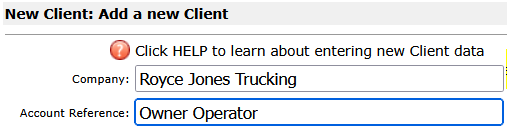
On the New Client page, for Company, enter the owner operator’s company name or enter a company name that reflects the owner/operator as exampled below. For Account Reference, enter Owner Operator as a straight forward identifier for the of account.
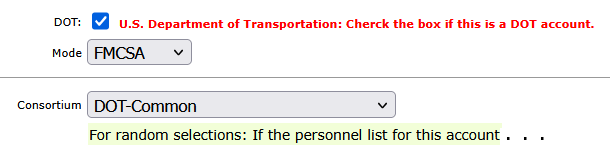
Since the account is for an owner operator, made the account a member of an FMCSA consortium. Joining a consortium and participating in the consortium random selections provides compliance with DOT regulations. Further down the New Client page choose the consortium for the account. In this example the account will be a member of the consortium DOT-Common - the user will choose from their consortium list in their database.
Click Save to create the new Client and its account. The next page will confirm the new client/account was successfully created:
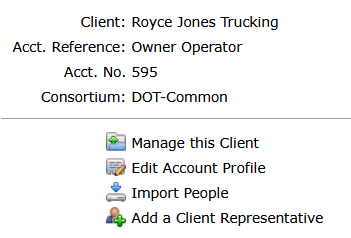
Now the owner operator can be entered as a participant in the account roster.
- Tap the Clients menu at the top of the page, and search for the new Client.
- From the client list tap the people icon outlined in red as shown below.
- The people icon includes a shield to indicate the account is DOT.
- On the right, just before the account name, an icon is displayed to indicate the account is a consortium member. Tap the icon to see the name of the consortium to which it belongs.

Streamline DOT Compliance and Drug Testing Management
Managing owner/operator accounts and placing them into a consortium is a critical step in maintaining DOT compliance and ensuring accurate participation in random drug and alcohol testing programs.
As outlined in this tutorial, properly setting up an account and associating it with the correct consortium helps streamline participant tracking and reporting requirements.
DrugTestNetwork.com provides a complete drug testing data management system designed for employers, consortium administrators, and third-party administrators (TPAs). From creating client accounts to managing employee rosters and owner/operators, the platform simplifies complex workflows required for random selections, audit-ready recordkeeping, FMCSA compliance, and all other DOT Modes.
Whether you are on-boarding new owner/operators, maintaining a drug-free workplace, or managing SAP/EAP program participants, DrugTestNetwork offers the tools needed to stay organized and compliant with a complete data management solution.
Features such as consortium management, participant tracking, automated random selections, and compliance reporting help reduce administrative burden and improve accuracy.
If your organization manages DOT-regulated employees or owner/operators, implementing a centralized system like DrugTestNetwork can significantly improve efficiency, reduce compliance risk, and ensure your drug testing program meets federal requirements.