
When search/listing clients to include Non-Active Accounts set the option:
Search ALL [Active & Not-Active].
By default the Client search only lists Active accounts. If the search turns up no results or it appears that an accounts is missing, it’s possible the account is Not-Active. To enable the search to return Active and Not-Active clients, set the search attribute as shown in the example below.
You can cycle through the options (Active, Not-Active, All) by tapping on the circular arrows icon  that precedes each of the search options.
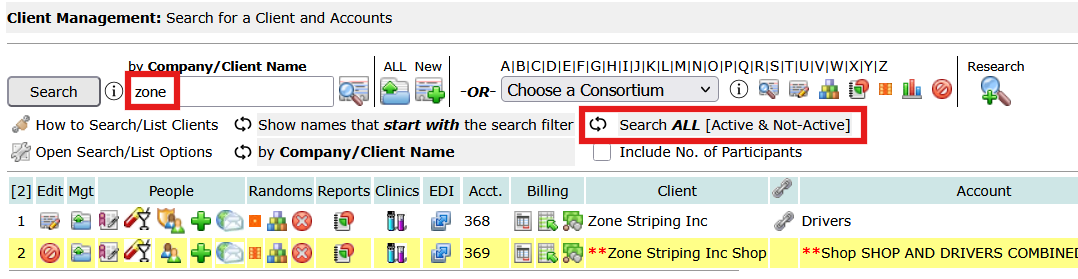
This example searches for a client whose name starts with Zone, and finds two with similar names. The first one is account no. 368, and the second one is account no. 369. Account numbers are assigned sequentially, so account no. 369 was probably entered accidentally, and when the user noticed it was a duplicate, it was made Not-Active.
**Note: when double asterisks (**) precede the client name it means the client is not-active and when double asterisks (**) precede the account name it means the account is not-active. A Client can have multiple accounts and some of its accounts can be Not-Active while the Client is Active.
Any client representative, company contacts, that belong to the not-active account would not be able to login to the portal.
Strengthen Your Drug Testing Program with Better Data Visibility
Managing Active vs. Not-Active clients and accounts is more than just a search setting—it’s a critical part of maintaining clean, accurate records in your drug testing program. As organizations grow, duplicate entries, inactive accounts, and outdated client records can easily lead to confusion, reporting errors, or missed compliance requirements.
With DrugTestNetwork.com, administrators gain full control over client status, account activity, and participant data across the entire system. Whether you’re managing DOT compliance, maintaining a drug-free workplace, or overseeing SAP/EAP program participants, having clear visibility into both active and inactive records ensures nothing falls through the cracks.
Features like flexible search filters, structured client/account relationships, and centralized data management allow organizations to:
- Quickly identify duplicate or outdated client records
- Maintain accurate account histories for audits and reporting
- Ensure proper inclusion or exclusion of records in compliance reports like DOT MIS
- Improve overall employee and participant management workflows
If your organization relies on accurate data to support drug testing, employee tracking, or regulatory compliance, implementing a system that intelligently manages active and inactive records isn’t optional—it’s essential.
DrugTestNetwork.com provides a complete solution for managing these complexities, helping organizations stay organized, compliant, and efficient at every stage of the drug testing process.